
In the previous article we gave Gemini access to tools and let it call them, closing the gap between an LLM and the outside world. This article closes a different gap: getting an LLM to answer questions about data it has never seen.
Ask GPT-4o about a document that was never part of its training data, and it has two options: admit that it does not know, or guess convincingly. Neither answer is acceptable in an application we build and ship. Retrieval-Augmented Generation, RAG, solves this without retraining or fine-tuning anything: we store our own data as vectors, look up the entries closest to a question, and hand only those entries to the LLM as context.
This article is the first of two parts. Here we build the feeder application: a small Go program that reads a set of fairy tales from a Markdown file, generates embeddings for each one using the OpenAI API, and stores them in Postgres with the pgvector extension. The second part covers the retrieval side, querying that data and feeding it back into a chat completion.
How RAG Works #
Retrieval-Augmented Generation is a pattern that pairs a search step with a generation step: we retrieve relevant text from our own storage, then ask an LLM to generate an answer using that text as context. What this means in practice is that the model’s knowledge stops being the only source of truth — our database becomes one too.
To make retrieval work, we first need a way to compare two pieces of text for similarity. That is what an embedding provides: a fixed-size array of floating-point numbers (1536 of them for OpenAI’s text-embedding-3-small model) that represents the meaning of a piece of text as a point in a high-dimensional space. Texts with similar meaning end up close to each other in that space; texts about unrelated topics end up far apart.
Visualizing 1536 dimensions is not something anyone can do directly, but the same idea holds in three dimensions: each text becomes a point in space, and the closer two points sit, the more similar their meanings.
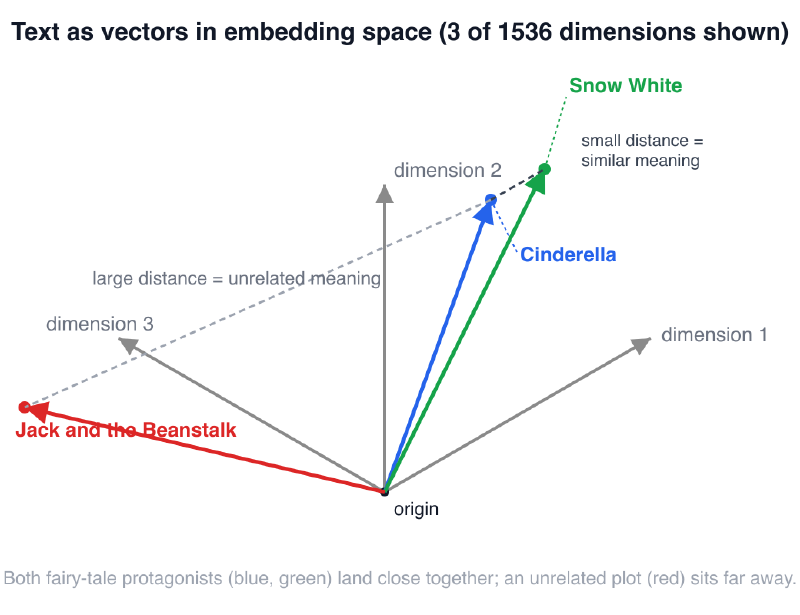
Postgres and pgvector give us three ways to measure that distance: Euclidean distance (<->), cosine distance (<=>), and inner product (<#>). Cosine distance is the most common choice for text embeddings, because it measures the angle between two vectors rather than their magnitude, which matters more for meaning than for raw scale.
With a way to measure similarity in place, we can describe the full RAG pattern: we embed a piece of text once and store the resulting vector; when a question comes in, we embed the question the same way and search for the stored vectors closest to it; we then pass the matching text, not the question alone, to the LLM and ask it to answer using that text. The model never needs to be retrained — the only thing that changes between applications is which vectors sit in the database.
This is exactly the job pgvector does for Postgres. It adds a vector column type, the distance operators mentioned above, and index types such as IVFFlat and HNSW that keep nearest-neighbor search fast even as a table grows well past what a full table scan could handle.
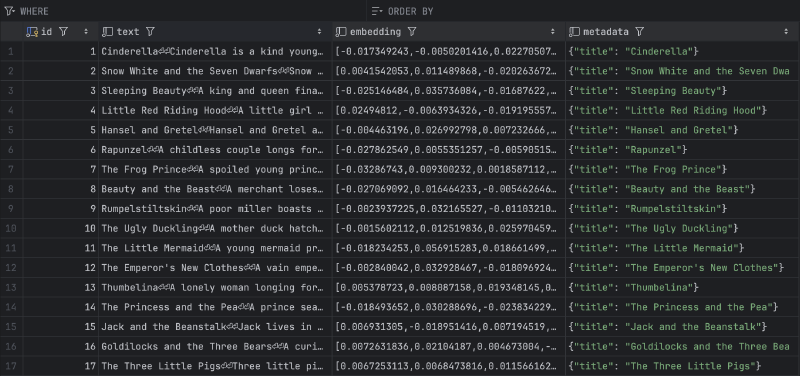
In practice, we store three things for every entry: the original text, its embedding, and any metadata worth keeping around — a title, a source URL, whatever helps us make sense of the result later. Searching is a normal SQL query: order the table by the distance operator against a query vector, and take the closest few rows with LIMIT.
Setting Up The Project #
Before writing any Go code, we need a running Postgres instance with the pgvector extension installed. Docker Compose is the fastest way to get one without touching whatever Postgres might already be running on our machine.
services:
  pgvector:
    image: pgvector/pgvector:pg17
    container_name: pgvector-db
    environment:
      POSTGRES_USER: pgvector
      POSTGRES_PASSWORD: supersecretpassword
      POSTGRES_DB: rag
    ports:
      - "5432:5432"
    healthcheck:
      test: ["CMD-SHELL", "pg_isready -U pgvector -d rag"]
      interval: 10s
      timeout: 5s
      retries: 10
The pgvector/pgvector:pg17 image is a normal Postgres 17 image with the pgvector extension already compiled in, so there is no separate installation step to run inside the container. The three environment variables set the database user, password, and database name our Go application connects to. Port 5432 is exposed locally so we can reach it from both the application and a database client. The healthcheck runs pg_isready every ten seconds and gives Postgres up to ten retries to come up — that matters if we start the application in the same script as the container, since a connection attempt would otherwise fail against a database still initializing.
With Postgres running, we still need to enable the pgvector extension inside the rag database and create a table to hold our fairy tales.
CREATE EXTENSION IF NOT EXISTS vector;

CREATE TABLE fairy_tales (
    id        bigserial PRIMARY KEY,
    text      text NOT NULL,
    embedding vector(1536) NOT NULL,
    metadata  jsonb NOT NULL
);
The text column holds the raw content we embedded — the same string we send back to the LLM once we retrieve it. embedding is a vector(1536) column, sized to match the output of the text-embedding-3-small model we use in the Go application; the dimension has to match exactly, or pgvector rejects the insert. metadata is a jsonb column for anything structured we want to keep alongside the text, such as the fairy tale’s title, without adding a dedicated column for every field we might need later.
RAG Feeder Application #
The application we build in this article has one job: read a Markdown file containing fairy tales, and store each one in the fairy_tales table with its embedding. We use 50 of the best-known fairy tales as the dataset, each with a title and a short, single-paragraph description. Every fairy tale becomes exactly one row in the table.
The source data lives in a single Markdown file, with each fairy tale as an H2 heading followed by its description:
## Cinderella

Cinderella is a kind young woman forced into servitude by her cruel stepmother
and two vain stepsisters after her father's death. She spends her days scrubbing
floors, cooking, and cleaning while sleeping among the cinders of the fireplace,
which gives her the nickname Cinderella. When the king announces a grand ball to
help the prince find a bride, Cinderella's stepfamily leaves her behind despite
her wish to attend. A fairy godmother appears and magically transforms a pumpkin
into a carriage, mice into horses, and Cinderella's rags into a beautiful gown
with glass slippers. She warns Cinderella that the magic will end at midnight.
...

## Snow White and the Seven Dwarfs

...
With the data in place, we can move to the Go application itself. It has three responsibilities: parse the Markdown file into a list of fairy tales, call the OpenAI API to get an embedding for each one, and insert the results into Postgres. We look at each part in turn, starting with the parser.
func parseFairyTales(path string) ([]fairyTale, error) {
	f, err := os.Open(path)
	if err != nil {
		return nil, fmt.Errorf("failed to open %s: %w", path, err)
	}
	defer f.Close()

	var tales []fairyTale
	var current *fairyTale

	scanner := bufio.NewScanner(f)
	scanner.Buffer(make([]byte, 0, 64*1024), 1024*1024)
	for scanner.Scan() {
		line := strings.TrimSpace(scanner.Text())
		if line == "" {
			continue
		}

		if title, ok := strings.CutPrefix(line, "## "); ok {
			tales = append(tales, fairyTale{
				Title: title,
			})
			current = &tales[len(tales)-1]
			continue
		}

		if current == nil {
			return nil, fmt.Errorf("body line found before any title: %q", line)
		}
		if current.Body != "" {
			return nil, fmt.Errorf("fairy tale %q has more than one body line, which this simple parser doesn't support", current.Title)
		}
		current.Body = line
	}
	if err := scanner.Err(); err != nil {
		return nil, fmt.Errorf("failed to read %s: %w", path, err)
	}

	return tales, nil
}
The parser reads the file line by line with a bufio.Scanner rather than loading the whole file into memory at once — a reasonable habit even for a file this small. Every line starting with ## marks the beginning of a new fairy tale, and the parser appends a new fairyTale entry with that title, keeping a pointer to it as current so the next line can fill in the body. Because the sample data uses exactly one description line per fairy tale, the parser treats a second body line, or a body line with no preceding title, as an error rather than trying to guess how to merge them — a simplification that would need revisiting for a file with multi-paragraph entries.
func fullText(tale fairyTale) string {
	return tale.Title + "\n\n" + tale.Body
}

func embedTales(ctx context.Context, client openai.Client, tales []fairyTale) ([][]float32, error) {
	texts := make([]string, len(tales))
	for i, tale := range tales {
		texts[i] = fullText(tale)
	}

	resp, err := client.Embeddings.New(ctx, openai.EmbeddingNewParams{
		Model: openai.EmbeddingModelTextEmbedding3Small,
		Input: openai.EmbeddingNewParamsInputUnion{
			OfArrayOfStrings: texts,
		},
	})
	if err != nil {
		return nil, fmt.Errorf("embeddings API call failed: %w", err)
	}
	if len(resp.Data) != len(tales) {
		return nil, fmt.Errorf("expected %d embeddings, got %d", len(tales), len(resp.Data))
	}

	vectors := make([][]float32, len(tales))
	for _, d := range resp.Data {
		v := make([]float32, len(d.Embedding))
		for i, f := range d.Embedding {
			v[i] = float32(f)
		}
		vectors[d.Index] = v
	}

	return vectors, nil
}
fullText combines the title and the body into the single string we actually embed, which means the title contributes to the vector as well as the description — useful later if someone searches for a fairy tale by name rather than by plot. embedTales sends every fairy tale in one call to the Embeddings API instead of one call per row, using text-embedding-3-small, the smaller and cheaper of OpenAI’s current embedding models, which is enough for a dataset this size. The response is not guaranteed to preserve the order of the input, so we place each returned embedding at resp.Data[i].Index rather than at position i, and convert the float64 values OpenAI returns into the float32 values pgvector-go expects.
func storeTales(ctx context.Context, conn *pgx.Conn, tales []fairyTale, vectors [][]float32) error {
	tx, err := conn.Begin(ctx)
	if err != nil {
		return fmt.Errorf("failed to begin transaction: %w", err)
	}
	defer tx.Rollback(ctx)

	insertSQL := "INSERT INTO fairy_tales (text, embedding, metadata) VALUES ($1, $2, $3::jsonb)"

	for i, tale := range tales {
		metadata, err := json.Marshal(map[string]string{"title": tale.Title})
		if err != nil {
			return fmt.Errorf("failed to marshal metadata for %q: %w", tale.Title, err)
		}

		_, err = tx.Exec(ctx, insertSQL, fullText(tale), pgvector.NewVector(vectors[i]), string(metadata))
		if err != nil {
			return fmt.Errorf("failed to insert %q: %w", tale.Title, err)
		}

		fmt.Printf("  [stored] %s\n", tale.Title)
	}

	if err := tx.Commit(ctx); err != nil {
		return fmt.Errorf("failed to commit transaction: %w", err)
	}

	return nil
}
storeTales wraps all 50 inserts in a single transaction, so a failure partway through leaves the table untouched instead of half-populated. For each fairy tale, we marshal a small metadata map containing the title into JSON, then insert the text, the embedding wrapped in pgvector.NewVector, and the metadata as a single row. The transaction only commits once every row has been inserted without error.
func main() {
	apiKey := os.Getenv("OPENAI_API_KEY")
	if apiKey == "" {
		log.Fatal("error: OPENAI_API_KEY environment variable is not set")
	}

	connString := os.Getenv("DATABASE_URL")
	if connString == "" {
		log.Fatal("error: DATABASE_URL environment variable is not set")
	}

	ctx := context.Background()

	tales, err := parseFairyTales("examples/rag_gpt/data/fairy_tales.md")
	if err != nil {
		log.Fatalf("error: %v\n", err)
	}
	fmt.Printf("Parsed %d fairy tales from %s\n", len(tales), "examples/rag_gpt/data/fairy_tales.md")

	client := openai.NewClient(option.WithAPIKey(apiKey))

	fmt.Println("Requesting embeddings...")
	vectors, err := embedTales(ctx, client, tales)
	if err != nil {
		log.Fatalf("error: %v\n", err)
	}

	conn, err := pgx.Connect(ctx, connString)
	if err != nil {
		log.Fatalf("error: failed to connect to database: %v\n", err)
	}
	defer conn.Close(ctx)

	if err := pgxvec.RegisterTypes(ctx, conn); err != nil {
		log.Fatalf("error: failed to register pgvector types (is the vector extension installed?): %v\n", err)
	}

	fmt.Println("Storing fairy tales...")
	if err := storeTales(ctx, conn, tales, vectors); err != nil {
		log.Fatalf("error: %v\n", err)
	}

	fmt.Printf("Done. Stored %d fairy tales in %q.\n", len(tales), "fairy_tales")
}
main wires the three pieces together. It reads OPENAI_API_KEY and DATABASE_URL from the environment and fails immediately if either is missing, rather than letting a later API call fail with a less obvious error. After parsing the Markdown file and requesting embeddings, it opens a connection to Postgres with pgx and calls pgxvec.RegisterTypes, which teaches the pgx driver how to encode and decode the vector column type — skipping this step causes the insert to fail as soon as it reaches the embedding argument. From there, storeTales does the rest.
With the Docker Compose file running, the extension and table created, and the two environment variables set, running the application produces output like this:
Parsed 50 fairy tales from examples/rag_gpt/data/fairy_tales.md
Requesting embeddings...
Storing fairy tales...
  [stored] Cinderella
  [stored] Snow White and the Seven Dwarfs
  ...
Done. Stored 50 fairy tales in "fairy_tales".
Once the run finishes, the fairy_tales table holds 50 rows, each with its text, embedding, and metadata:
Conclusion #
We now have a working feeder: a Go application that parses a Markdown file, generates OpenAI embeddings for each fairy tale, and stores the text, the vector, and the metadata in Postgres through pgvector. That gives us the foundation for retrieval (a table of vectors we can search) but no way yet to query it from an application. The next article in this series covers exactly that: turning a question into an embedding, finding the closest fairy tales, and using them as context for a chat completion.