
In the previous article we built a feeder application: it reads fairy tales from a Markdown file, generates an OpenAI embedding for each one, and stores the text, the vector, and a small metadata blob in Postgres through pgvector. That gave us a table full of vectors, but no way to query it from a running application — the data sat there, searchable only by hand, through a database client.
This article closes that gap. We build a small conversational agent that searches the fairy tale library through a tool and answers using only what that tool returns, not whatever GPT happens to remember about fairy tales from its training data. The model decides on its own when a search is needed, based on what the user actually asks.
Setting Up The Project #
Everything here builds on top of the previous article, so the same Docker Compose setup (a Postgres 17 container with the pgvector extension baked in) needs to be running, with the fairy_tales table already populated by the feeder. If that step has not happened yet, the first article walks through the Docker Compose file, the table schema, and the feeder application that fills it with fifty fairy tales.
Assuming the feeder already ran, the table looks like this:
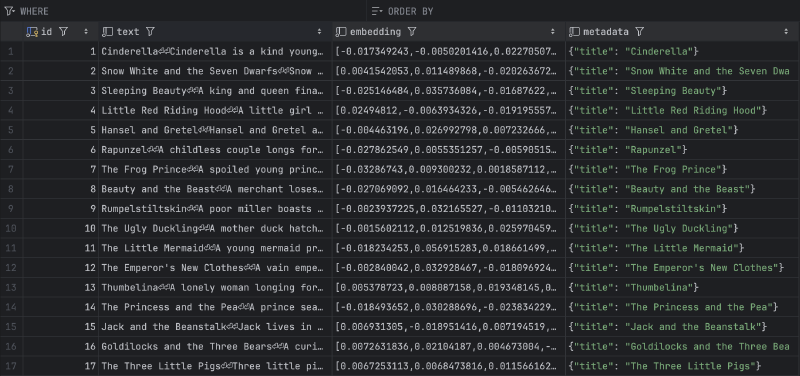
The data is in place, but the goal for this article is different from a one-off SQL query: we want an AI agent to decide, on its own, when a search is needed and what to search for. Running a hardcoded query against every user message would not give the model that choice. That means giving the agent a tool — a function with a name, a description, and a parameter schema — that it can choose to call.
The tool itself is allowed to call the OpenAI API. The agent calls GPT to decide it needs information, and the tool it invokes then calls the Embeddings API on its own to turn that request into a vector before it ever touches Postgres. Nothing forces every OpenAI call in an application through the same layer: a tool is just a Go function, and that function can talk to whatever it needs to get its job done.
Tool For Retrieval #
Search starts with turning the user’s natural-language request into the same kind of vector the feeder stored for every fairy tale. That is a single call to the Embeddings API, wrapped in its own function:
func embedQuery(ctx context.Context, query string) ([]float32, error) {
	resp, err := openaiClient.Embeddings.New(ctx, openai.EmbeddingNewParams{
		Model: openai.EmbeddingModelTextEmbedding3Small,
		Input: openai.EmbeddingNewParamsInputUnion{OfString: openai.String(query)},
	})
	if err != nil {
		return nil, fmt.Errorf("embeddings API call failed: %w", err)
	}
	if len(resp.Data) != 1 {
		return nil, fmt.Errorf("expected 1 embedding, got %d", len(resp.Data))
	}

	raw := resp.Data[0].Embedding
	vector := make([]float32, len(raw))
	for i, f := range raw {
		vector[i] = float32(f)
	}
	return vector, nil
}
embedQuery mirrors the embedding call from the feeder application, with one difference: it sends a single string rather than a batch, using OfString instead of OfArrayOfStrings on EmbeddingNewParamsInputUnion. The rest is the same conversion we already needed in the feeder — OpenAI returns float64 values, and pgvector-go expects float32, so the function converts every element before returning the vector. Using the same text-embedding-3-small model here as during ingestion is not optional: two embeddings only end up close together in vector space if they came from the same model, so the query and the stored data have to be embedded the same way.
With a way to embed the query, the next function runs the actual similarity search against Postgres:
var dbConn *pgx.Conn

type searchMatch struct {
	Title    string  `json:"title"`
	Text     string  `json:"text"`
	Distance float64 `json:"distance"`
}

func searchFairyTale(ctx context.Context, description string) ([]searchMatch, error) {
	vector, err := embedQuery(ctx, description)
	if err != nil {
		return nil, err
	}

	rows, err := dbConn.Query(ctx,
		"SELECT text, metadata, embedding <=> $1 AS distance FROM fairy_tales ORDER BY distance LIMIT $2",
		pgvector.NewVector(vector),
		3,
	)
	if err != nil {
		return nil, fmt.Errorf("search query failed: %w", err)
	}
	defer rows.Close()

	var matches []searchMatch
	for rows.Next() {
		var text string
		var metadata []byte
		var distance float64
		if err := rows.Scan(&text, &metadata, &distance); err != nil {
			return nil, fmt.Errorf("failed to scan row: %w", err)
		}

		var meta struct {
			Title string `json:"title"`
		}
		if err := json.Unmarshal(metadata, &meta); err != nil {
			return nil, fmt.Errorf("failed to parse metadata: %w", err)
		}

		matches = append(matches, searchMatch{
			Title:    meta.Title,
			Text:     text,
			Distance: distance,
		})
	}
	if err := rows.Err(); err != nil {
		return nil, fmt.Errorf("failed to read search results: %w", err)
	}

	return matches, nil
}
Unlike the feeder, which passed its *pgx.Conn around as an explicit parameter, this application keeps the connection as a package-level variable, dbConn. That is a deliberate trade-off: the tool call chain runs several layers below main, and threading a connection through every function signature just to reach searchFairyTale would add noise without adding safety in a program this size.
searchFairyTale embeds the incoming description with embedQuery, then runs a single SQL query that orders the whole fairy_tales table by cosine distance (<=>) against that vector and takes the three closest rows with LIMIT. For every row, the metadata column (stored as jsonb) gets unmarshaled into an anonymous struct just far enough to pull out the title, and the result is collected into a searchMatch that carries the title, the full text, and the distance score back to the caller. Returning the distance alongside the text matters: it gives the model a signal for how confident the match actually is, rather than presenting three results as if they were equally relevant.
Retrieval is now a plain Go function, so the next step is describing it to the model as a tool, the same way tool calling with the Chat Completions API was introduced for a time-lookup tool earlier in this series:
var searchToolDefinition = openai.ChatCompletionToolParam{
	Type: "function",
	Function: openai.FunctionDefinitionParam{
		Name: "search_fairy_tale",
		Description: openai.String(
			"Search the fairy tale library for tales matching a natural-language description " +
				"of their plot, characters, or theme. Returns the most similar tales with their full text.",
		),
		Parameters: openai.FunctionParameters{
			"type": "object",
			"properties": map[string]interface{}{
				"description": map[string]interface{}{
					"type":        "string",
					"description": "A description of the fairy tale to look for, e.g. plot points, characters, or setting.",
				},
			},
			"required":             []string{"description"},
			"additionalProperties": false,
		},
	},
}

func callTool(ctx context.Context, call openai.ChatCompletionMessageToolCall) (string, error) {
	switch call.Function.Name {
	case "search_fairy_tale":
		var args searchArgs
		if err := json.Unmarshal([]byte(call.Function.Arguments), &args); err != nil {
			return "", fmt.Errorf("failed to parse tool arguments: %w", err)
		}

		matches, err := searchFairyTale(ctx, args.Description)
		if err != nil {
			errMsg, _ := json.Marshal(map[string]string{"error": err.Error()})
			return string(errMsg), nil
		}

		out, err := json.Marshal(matches)
		if err != nil {
			return "", fmt.Errorf("failed to marshal tool result: %w", err)
		}
		return string(out), nil

	default:
		return "", fmt.Errorf("unknown tool: %q", call.Function.Name)
	}
}
searchToolDefinition follows the same shape as any other tool definition: a Name the model uses when it wants to call the function, a Description the model reads to decide whether this tool is the right one for the current message, and a Parameters block that requires a single description string. That description field is what the model fills in with its own summary of what the user is looking for — not the user’s raw message, but the model’s interpretation of it, which tends to search better than the literal wording ever could.
callTool is the same router pattern used for the time tool earlier in the series: it switches on the function name the model requested, unmarshals the JSON arguments into searchArgs, and calls searchFairyTale with the description the model provided. A failed search gets marshaled into a JSON error payload and returned without an error value, so the model sees what went wrong and can respond to the user instead of crashing the loop. A successful search gets marshaled into JSON directly (titles, text, and distances included) and handed back as the tool result.
AI Agent #
The agent loop itself needs no new ideas beyond what tool calling with the Chat Completions API already covered — it is the same request-check-execute-repeat cycle, wired to the search tool instead of a time lookup:
var history []openai.ChatCompletionMessageParamUnion
var openaiClient openai.Client

func talkToAgent(ctx context.Context) (string, error) {
	for {
		resp, err := openaiClient.Chat.Completions.New(ctx, openai.ChatCompletionNewParams{
			Model:    openai.ChatModelGPT4oMini,
			Messages: history,
			Tools: []openai.ChatCompletionToolParam{
				searchToolDefinition,
			},
		})
		if err != nil {
			return "", fmt.Errorf("API call failed: %w", err)
		}

		choice := resp.Choices[0]
		history = append(history, choice.Message.ToParam())

		if len(choice.Message.ToolCalls) == 0 {
			return choice.Message.Content, nil
		}

		for _, call := range choice.Message.ToolCalls {
			fmt.Printf("  [tool] %s(%s)\n", call.Function.Name, call.Function.Arguments)

			result, err := callTool(ctx, call)
			if err != nil {
				return "", err
			}

			history = append(history, openai.ToolMessage(result, call.ID))
		}
	}
}
talkToAgent sends the full conversation history plus the searchToolDefinition on every request. When the model responds with no tool calls, its message is the final answer and the loop returns it directly. When it does request a call — search_fairy_tale, in this application’s case — the loop executes it through callTool, appends the JSON result to the history as a tool message tied to the call’s ID, and fires another request so the model can turn that result into an answer. ChatModelGPT4oMini is used here rather than a larger model, since tool-routing and grounded summarization are well within what a smaller model handles reliably.
The last piece wires the database connection, the OpenAI client, and the system prompt together, then runs the read loop:
func main() {
	apiKey := os.Getenv("OPENAI_API_KEY")
	if apiKey == "" {
		log.Fatal("error: OPENAI_API_KEY environment variable is not set")
	}

	connString := os.Getenv("DATABASE_URL")
	if connString == "" {
		log.Fatal("error: DATABASE_URL environment variable is not set")
	}

	ctx := context.Background()

	var err error
	dbConn, err = pgx.Connect(ctx, connString)
	if err != nil {
		log.Fatalf("error: failed to connect to database: %v\n", err)
	}
	defer dbConn.Close(ctx)

	if err := pgxvec.RegisterTypes(ctx, dbConn); err != nil {
		log.Fatalf("error: failed to register pgvector types (is the vector extension installed?): %v\n", err)
	}

	openaiClient = openai.NewClient(option.WithAPIKey(apiKey))

	history = append(history, openai.SystemMessage(
		"You are a fairy tale librarian. "+
			"When the user describes a fairy tale by its plot, characters, or theme, "+
			"always use the search_fairy_tale tool to find it in the library. "+
			"Never rely on your own memory of fairy tales; base your answer only on what the tool returns. "+
			"If nothing relevant is found, say so.",
	))

	scanner := bufio.NewScanner(os.Stdin)
	fmt.Println("Fairy tale librarian ready. Describe a fairy tale, or type 'exit' to quit.")
	fmt.Println()

	for {
		fmt.Print("Human: ")
		if !scanner.Scan() {
			break
		}

		input := strings.TrimSpace(scanner.Text())
		if input == "" {
			continue
		}
		if strings.EqualFold(input, "exit") {
			fmt.Println("Bye.")
			break
		}

		history = append(history, openai.UserMessage(input))

		answer, err := talkToAgent(ctx)
		if err != nil {
			log.Fatalf("error: %v\n", err)
		}

		fmt.Printf("Agent: %s\n\n", answer)
	}
}
main reads OPENAI_API_KEY and DATABASE_URL from the environment and fails immediately if either is missing, connects to Postgres with pgx, and calls pgxvec.RegisterTypes so the driver knows how to encode and decode the vector column — the same registration step the feeder needed before it could insert embeddings. The system prompt is where the retrieval behavior actually gets enforced: it tells the model to always call search_fairy_tale when a user describes a plot, characters, or theme, and explicitly forbids answering from its own memory of fairy tales. Without that instruction, GPT-4o mini already knows plenty about Cinderella and would happily answer without ever touching the database — which defeats the purpose of building a RAG application in the first place. From there, the loop reads a line, appends it to history as a user message, and prints whatever talkToAgent returns.
Running the application, with the container up and the table populated, produces this exchange:
Fairy tale librarian ready. Describe a fairy tale, or type 'exit' to quit.

Human: Do you have an access to the internet?
Agent: No, I don't have access to the internet. I can only provide information based on the fairy tale library I have access to. If you're looking for a specific fairy tale, please describe it, and I'll try to find it for you!

Human: Can you tell me which fairy tale mentions a girl that cleans house for her stepmother and stepsisters?
  [tool] search_fairy_tale({"description":"a girl that cleans house for her stepmother and stepsisters"})
Agent: The fairy tale that mentions a girl who cleans house for her stepmother and stepsisters is **Cinderella**.

In this story, Cinderella is a kind young woman forced into servitude by her cruel stepmother and two vain stepsisters after her father's death. She spends her days scrubbing floors, cooking, and cleaning while living among the cinders of the fireplace, which gives her the nickname Cinderella. The tale goes on to describe her magical transformation and eventual escape from her life of servitude.

If you would like to know more about Cinderella or any other tales, feel free to ask!
The first question triggers no tool call at all — the model answers directly, since nothing about internet access requires searching the fairy tale library. The second question is where the system prompt earns its keep: the model rewrites the user’s question into a search description, calls search_fairy_tale, and only then answers, using text that traces back to a specific row in the fairy_tales table, not to whatever GPT already knew about Cinderella.
Conclusion #
Across these two articles, we built the full RAG loop end to end: a feeder that embeds and stores text, and an agent that embeds a question, searches for the closest matches, and answers from what it retrieves instead of from memory. Cosine distance and a LIMIT clause did most of the actual work — the harder part was giving the model a tool it could decide to call on its own, and a system prompt strict enough to keep it from skipping that step. The same pattern extends past fairy tales to any dataset that changes faster than a model’s training data.